RSS

Category Archives: Scientific

Inequality, Lorenz-Curves and Gini-Index

In a previous post we looked at inequality of profits and the useful abstraction of the Whale-Curve to analyze Customer Profitability. Here I want to focus on inequality and its measurement and visualization in a broader sense.

A fundamental graphical representation of the form of a distribution is given by the Lorenz-Curve. It plots the cumulative contribution to a quantity over a contributing population. It is often used in economics to depict the inequality of wealth or income distribution in a population.
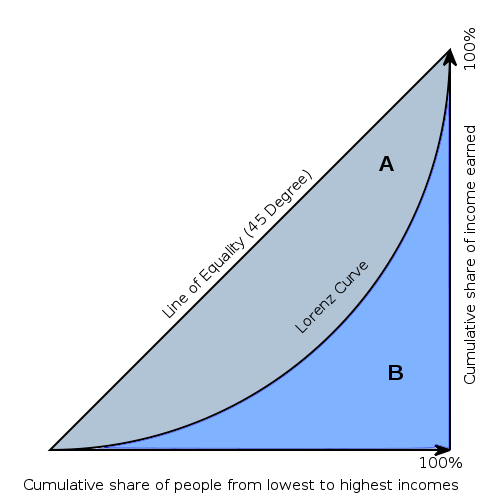
Lorenz Curve (Source: Wikipedia)

The Lorenz-Curve shows the y% contribution of the bottom x% of the population. The x-axis has the population sorted by increasing contributions; (i.e. the poorest on the left and the richest on the right). Hence the Lorenz-Curve is always at or below the diagonal line, which represents perfect equality. (By contrast, the x-axis of the Whale-Curve sorts by decreasing profit contributions.)

The Gini-Index is defined as G =  A / (A + B) , G = 2A  or G = 1 – 2B

Since each axis is normalized to 100%, A + B = 1/2 and all of the above are equivalent. Perfect equality means G = 0. Maximum inequality G = 1 is achieved if one member of the population contributes everything and everybody else contributes nothing.

An interesting interactive graph demonstrating Lorenz-Curves and corresponding Gini-Index values can be found here at the Wolfram Demonstration project.

The GINI Index is often used to indicate the income or wealth inequality of countries. The corresponding values of the GINI index are typically between 0.25 and 0.35 for modern, developed countries and higher in developing countries such as 0.45 – 0.55 in Latin America and up to 0.70 in some African countries with extreme income inequality.

GINI index of world countries in 2009 (Source: Wikipedia)

Graphically, many different shapes of the Lorenz-Curve can lead to the same areas A and B, and hence many different distributions of inequality can lead to the same GINI index. How can one determine the GINI index? If one has all the data, one can numerically determine the value from all the differences for each member of the population. An example of that is shown here to determine the inequality of market share for 10 trucking companies.
Another approach is to model the actual distribution using a formal statistical distribution with known properties such as Pareto, Log-Normal or Weibull. With a given formal distribution one can often calculate the GINI index analytically. See for example the paper by Michel Lubrano on “The Econometrics of Inequality and Poverty“. In another example, Eric Kemp-Benedict shows in this paper on “Income Distribution and Poverty” how well various statistical distributions match the actually measured data. It is commonly held that at the high end of the income the Pareto distribution is a good model (with its inherent Power law characteristic), while overall the Log-Normal is the best approximation.

After studying several of these papers I started to ask myself: If x% of the population contribute y% to the total, what’s the corresponding GINI index? For example, for the famous “80-20 rule” with 20% of the population contributing 80% of the result, what’s the GINI index for the 80-20 rule?

To answer this question I created a simple model of inequality based on a Pareto distribution. Its shape parameter controls the curvature of the distribution, which in turn determines the GINI index. The latter is visualized as color-coded bands using a 2D contour plot in the following graphic:

GINI index contour plot based on Pareto distribution model

The sample data point “A” corresponds to the 80-20 rule, which leads to a GINI index of about 0.75 (strongly unequal distribution). Data point “B” is an example of an extremely unequal distribution, namely US political donations (data from 2010 according to a statistic from the Center of Responsive Politics recently cited by CNNMoney):

“…a relatively small number of Americans do wield an outsized influence when it comes to political donations. Only 0.04% of Americans give in excess of $200 to candidates, parties or political action committees — and those donations account for 64.8% of all contributions”

0.04% contribute 64.8% of the total! Here is another way of describing this: If you had 2500 donors, the top donor gives twice as much as the other 2499 combined. This extreme amount of inequality corresponds to a GINI index of 0.89 (needless to say that this does not seem like a very democratic process…)

As for US income I created a separate graphic with data points from the high end of the income spectrum (where the underlying Pareto distribution model is a good fit): The top 1% (who earn 18% of all income), top 0.1% (8%), and top 0.01% (3.5%).
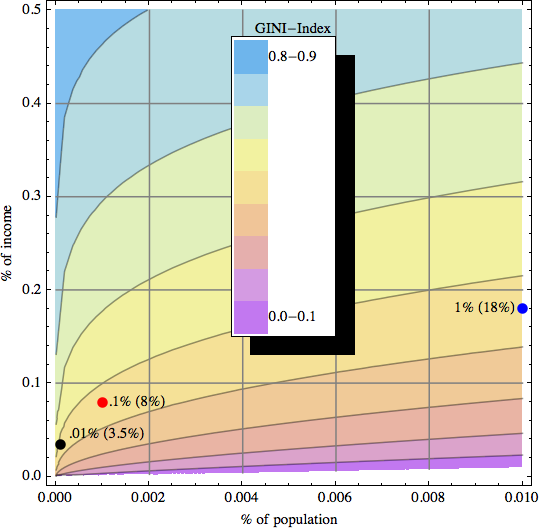
GINI Index Contour Plot with high end US Income distribution data points

These 3 data points are taken from Timothy Noah’s “The United States of Inequality“, a 10-part article series on Slate, which in turn is based on data and research from 2008 by Emmanuel Saez and visualizations by Catherine Mulbrandon of VisualizingEconomics.com. This shows the 2008 US income inequality has a GINI Index of approximately 0.46, which is unusually high for a developed country. Income inequality has grown in the US since around 1970, and the above article series analyzes potential factors contributing to that – but that’s a topic for another post. In the spirit of visualizing data to create insight, I’ll just leave you with this link to the corresponding 10-part visual guide to inequality:

Postscript: In April 2012 I came across a nice interactive visualization on the DataBlick website created by Anya A’Hearn using Tableau. It shows the trends of US income inequality over the last 90 years with 7 different categories (Top x% shares) and makes a good showcase for the illustrative power of interactive graphics.

 
6 Comments

Posted by on September 2, 2011 in Financial, Industrial, Scientific, Socioeconomic


Tags: , ,

Customer Profitability

Inequality is often at the root of structure and contrasts. Exposing inequality can often lead to insight. For example, take the well-known Pareto principle, which states that roughly 80% of the effects come from 20% of the causes (hence also referred to as the 80-20 rule).

From the above Wikipedia page on the Pareto principle, chapter on business:

The distribution shows up in several different aspects relevant to entrepreneurs and business managers. For example:
80% of your profits come from 20% of your customers
80% of your complaints come from 20% of your customers
80% of your profits come from 20% of the time you spend
80% of your sales come from 20% of your products
80% of your sales are made by 20% of your sales staff
Therefore, many businesses have an easy access to dramatic improvements in profitability by focusing on the most effective areas and eliminating, ignoring, automating, delegating or re-training the rest, as appropriate.

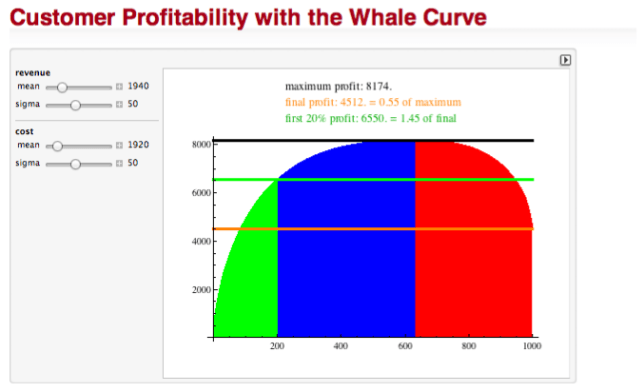
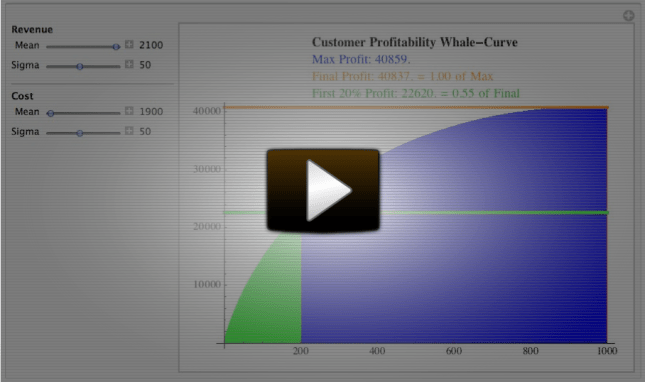
Visualization can be a powerful instrument for such analysis. For customer profitability, a graphical representation of this inequality is often used as a starting point for analysis. A commonly used visualization is the so-called Whale-Curve. I created a short, 4 min video recording of a dynamic Whale-Curve Demonstration:

In case you’re curious, the above demonstration uses an underlying model I created in Mathematica. You can dynamically interact with it yourself using the free CDF (Computable Document Format) Player:

I have provided it as a contribution to the Wolfram Demonstration project, so you can download it, and even look at the source code if you are a Mathematica user.

If you are interested in applying customer profitability analysis to your business, you may want to consider the company RapidBusinessModeling, which has an elaborate analysis approach starting with such Whale-Curves.

The underlying notion of Inequality is a fundamental concept. We will look at it in other contexts in a later post.

 
2 Comments

Posted by on August 18, 2011 in Financial, Industrial, Scientific


Tags: , , , ,

Bubble Charts and GapMinder’s Trendalyzer

Bubble Charts are a powerful way to visualize data over time. They typically consist of a set of circles moving dynamically around in a two-dimensional box. One of the best illustrations of these charts comes from the GapMinder foundation. From their website mission statement:

The initial activity was to pursue the development of the Trendalyzer software. Trendalyzer sought to unveil the beauty of statistical time series by converting boring numbers into enjoyable, animated and interactive graphics. The current version of Trendalyzer is available since March 2006 as Gapminder World, a web-service displaying time series of development statistics for all countries.

In March 2007, Google acquired Trendalyzer from the Gapminder Foundation and the team of developers who formerly worked for Gapminder joined Google in California in April 2007.

Some of you may have seen Hans Rosling’s TED talks which leverage this tool. (For example, his 2007 talk on new insights on poverty or his 2010 talk on the good news of the decade about child mortality.) Some reviewers have said that in his talks, “data comes to live and sings” to the audience.

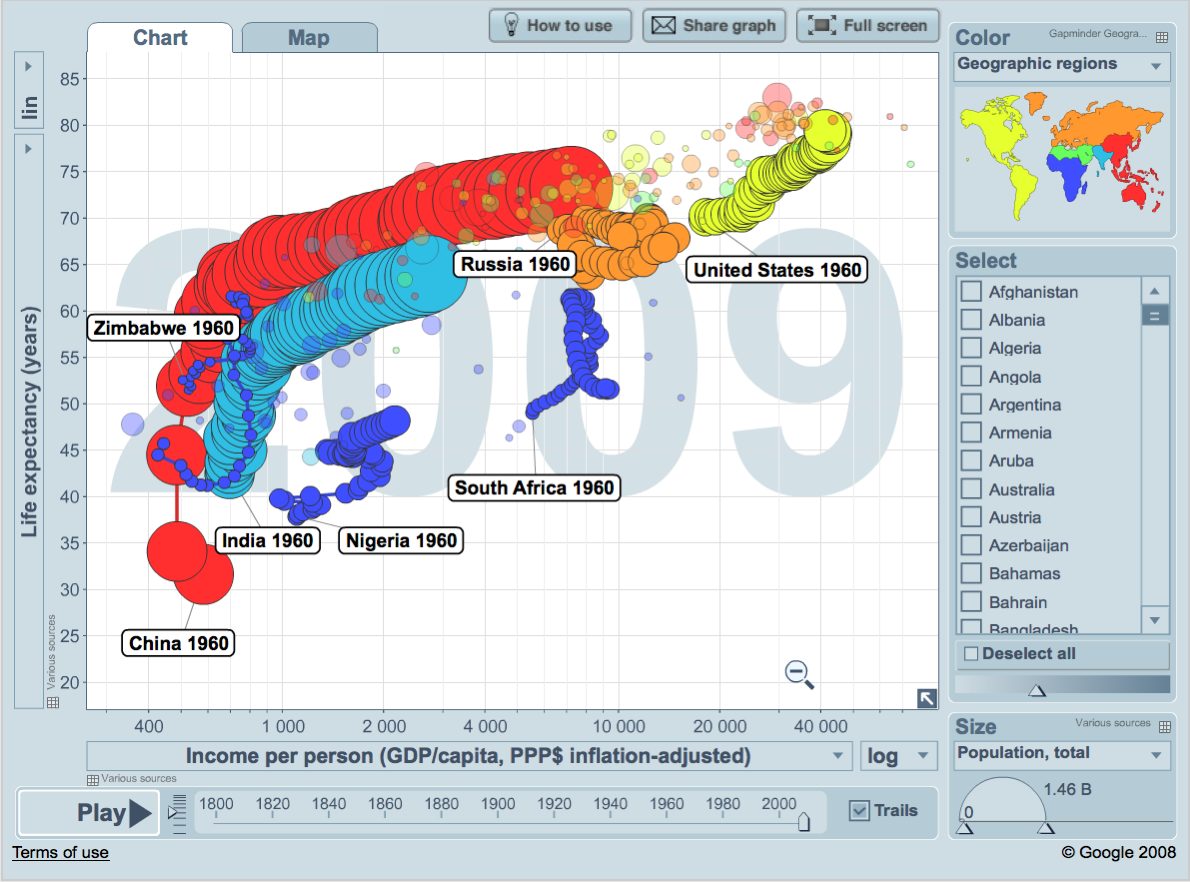
Snapshot of selected Nations Wealth and Health information for a given year.

Let’s look at the Trendalyzer above with data on the Nation’s Health and Wealth to illustrate the power of Bubble Charts:

  • Each Bubble corresponds to one nation X (say China)
  • Each Axis represents one scalar variable of the nation (here the wealth and health of nation X)
  • Position of bubble indicates the data point of the two axis variables at a given time (1960)
  • Size of bubble indicates a third scalar variable (population size of nation X)
  • Color of bubble indicates a category of the nation X, such as continent or other classification
  • Trajectory of bubble indicates the change over time (here ~ 50 years from 1960 to 2009 in annual steps)
  • With the Trendalyzer you can interact with the data in a variety of ways. You can change the two dimensions of nations data you care about. You can set the axis to linear or logarithmic to adjust the range of motion along the axis based on the data. You can select a subset of nations to highlight their bubbles. You can check to track the trajectory of bubbles over time. You can change the classification and it’s corresponding color scheme. You can manually slide time back and forth or start an automatic run through time. Here is another snapshot of the same data set:

    50 year time trace of nations wealth and health with 7 selected countries highlighted.

    This one graph alone shows a lot of interesting trends. India and China (light blue and red) both rapidly improved life expectancy between 1960 and 1980, and in the next three decades steadily improved GDP/capita. During the cold war both Russia (orange) and the United States (yellow) slowly improved wealth, but only the US increased health as well; and after the collapse of the Soviet Union in the 90’s Russia regressed in its GDP/capita back to nearly 1960 levels before slowly gaining again in the following decade. The three African countries (dark blue) both started in very different positions and each had unique trajectories. Zimbabwe started out with the highest life expectancy, but then had a devastating decade in the 90’s with the HIV epidemic taking its toll and reducing life expectancy down from 60 to around 40, followed by a backslide into more extreme poverty over the following decade. Nigeria, Africa’s most populous nation, has improved more steadily and now overtaken Zimbabwe both on average health and wealth. South Africa had slow gains in wealth throughout, but after sizable gains in health until the early 90’s, a precipitous decline brought that nation’s health back down again to near 1960 levels.

    Despite the extraordinary amount of information aggregated in such a graph, even more insight comes from interacting with the data and seeing the dynamic change in size and position over a time series. This is the central theme of this Blog: Creating insight from rich data visualizations through interaction and display of changes in real time. I encourage you to do so with the Trendalyzer tool at the Gapminder World website (requires Flash).

     
    4 Comments

    Posted by on July 28, 2011 in Industrial, Scientific, Socioeconomic


    Tags: , ,

    New book: Visualize This by Nathan Yau

    Released just 2 weeks ago I got a copy of “Visualize This”, the new book by FlowingData Blog author Nathan Yau.

    Nathan Yau's Blog "FlowingData" and new book "Visualize This"

    You can of course get a lot of details on Nathan’s own website here as well as reviews on Amazon. Below are my first impressions after spending a few hours with this book.

    If you have followed Nathan’s blog you will recognize many topics in the book. The book gives a good introduction how to create graphs and visualizations to “tell a story” to the audience. It has comprehensive coverage of topics such as where to get data from, how to get them into the right format and validate them, which tools to use based on what type of aggregation or visualization you intend to create. He focuses specifically on R, a programming language for statistical computing and graphics. He also recommends using a box of tools to leverage the strengths of each of them, such as quickly creating a raw chart in R and then dressing it up in Adobe Illustrator. I’d certainly enjoy using the examples as a tutorial for learning the R language.

    The book deserves a lot of credit for being laid out well and using a lot of practical examples from everyday life (aging trends, crime rates, economic charts, unemployment data, company store location & growth, urban population, fertility rates, etc.) which most people can relate to. It’s enjoyable to read and makes its points in fluid, yet precise language.

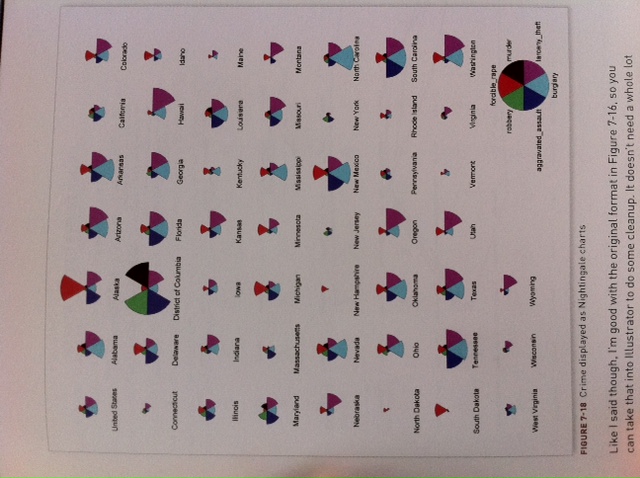
    I already took away a few new ideas about aggregate matrix plots (such as Figure 6-9 Scatterplot matrix of crime rates) or using shapes to compare vectors of multiple variables (such as the star charts and Nightingale Charts in chapter 7). For example, I think the Nightingale chart in Figure 7-18 of crime rates by US state is a very useful visualization showing at a glance both the relative amount as well as the break-down into 6 different types of crime per state.

    Sample figure with Nightingale Charts displaying crime rates per US state

    Don’t expect to learn much in terms of statistics – this book doesn’t purport to go into any sort of statistical depth. It is focused primarily on how to get good visualizations, as compared to incorrect, misleading or even purposely distorting graphs – what Nathan refers to as “Ugly Visualizations” on his Blog.

    If I had one wish regarding the contents of this book – or perhaps a sequel some day – I’d say to focus a bit more on interactive graphics. This is obviously hard to do in a printed book, whose pages will always be static. However, there is so much innovation in this area and with the advent of electronic books and media players for interactive content. Together with the advent of mobile computing platforms such as the iPad and book readers such as the Kindle I’m convinced that interactive graphics will enable a whole new way to “tell the story”.

     
    1 Comment

    Posted by on July 27, 2011 in Industrial, Scientific


    Tags: ,

    TreeMaps

    Around 1990 Ben Shneiderman invented TreeMaps as a way to visualize a hierarchy of nodes in a constrained space, for example a rectangle of fixed size. TreeMaps have since been integrated in various tools and are used for interactive graphics in several newspapers and magazines, such as the BBC and NYTimes in the following two examples.

    Top 100 Internet sites (Source: BBC online article in Jan 2010)

    TreeMap for the TOP 100 Internet Sites as of Jan 2010. In the interactive version (Flash-based) hovering over a rectangle will display the underlying data.

    Trucks, Vans, S.U.V. sales in the US (Source: NYTimes article in Feb 2007)

    Composite TreeMap of Truck, Van, S.U.V. sales performance in the US by manufacturer..

    A history of TreeMaps with many beautiful examples has been compiled by Ben Shneiderman here. My favorite is this variation of a circular TreeMap by Kai Wetzel, a graph showing disk usage by folder with color code showing age of files.

    Circular TreeMap showing disk usage (size) and file age (color) of a hierarchical directory structure.

    Who says visualizing complex information can’t be informative and aesthetically pleasing at the same time?

     
    3 Comments

    Posted by on June 22, 2011 in Art, Industrial, Scientific


    Tags:

    Interactive and Visual Information

    The way we create and consume documents to present and understand information is changing.

    Online information has started this trend around 1995. Web page content has rapidly evolved from static content in the 1990’s to much more dynamic and somewhat interactive content. Most web sites today are continuously updated with streams of new information and allow the user to query for specific information, say about the weather in a particular region or the stock price of a particular company. Users can query databases to retrieve wanted information. Users can search the web and follow links to pages likely relevant to the search. Users can type in questions and receive answers, in some cases calculated from available models and data. I have written about the evolutionary impact of this on the presentation of information during meetings. (Technology also moves towards other forms of interaction without typing or touching, such as voice-recognition a la Google Voice or motion-detection a la Microsoft Kinect. But the focus here is not on the nature of the interaction format as much as on its impact on the information transfer.)

    The composition of online information has also drastically changed. This goes far beyond hyperlinking documents for easy navigation. Instead of one area of text per site (as is the standard model in a book) we now routinely have multiple areas on the page showing different, often related pieces of information. Input fields and other controls allow for interaction, such as entering a stock ticker symbol and then hovering over the generated historical chart for analysis. Multiple widgets or components make up modern web sites, often highly customizable and aggregating information from various sources or feeds. With the advent of digital music, photo and video this turned into multimedia information. The latter offers the potential to re-shape the way information is produced and consumed in electronic books. The combination of new form factors (such as the iPad), nearly ubiquitous wireless Internet connectivity, tremendous processing power, increased battery life, rising popularity and adoption of eBook readers and constantly improving authoring tools ushers in a new era of content. An example of the sophisticated use of multimedia and touch interface on the iPad is the book (in custom app format) “Our Choice” from Al Gore, released by Push-Print-Press.

    Map of solar power density across the U.S. Note interactive popup with location-specific detail (data both lookup and calculated).

    No longer tethered to power outlets and network cables, we now have greater mobility of information than ever before. This leads to additional possibilities such as location-based services, as the presentation of information can be customized to the location of the reader. (“Where are some nearby restaurants or gas stations?”) Conversely, the location of the reader can be tracked over time and thus new location-based information and services are created.

    Of particular interest is interactive information based on executable models which can simulate or calculate outcomes based on parameters interactively set by the reader. Conceptually, the document now acts as a container not just for text and images, but for models which can carry out computations. A simple example might be a mortgage calculator: Type in a loan amount, drag a slider to reflect interest rates and repayment time, and out comes the monthly payments and other details. Embedding such a calculator in a document transforms the passive reading experience into an interacting exploration.

    Or think of a business model with parameters such as production volumes, storage, pricing and customer order rates. Now one can interact and explore ranges of model behavior as well as boundaries (profit/loss, break-even, etc.) Here are two examples of such business models of increasing complexity:

    Just like Adobe coined the term PDF (Portable Document Format) trying to establish a standard for portability, Wolfram Research has coined the term CDF (Computable Document Format) trying to establish a standard for computability. The two above and many other examples can be found on Wolfram Research’s CDF demonstrations page. The best way to understand such models is to interact with them. (For CDF you will have to install a free browser plug-in.) A good article on the potential of CDF for presenting information in a business context is here.

    Another very interesting example of the presentation of a dynamic nonlinear system is provided by Bret Victor below. It focuses on two fundamental concepts: Ubiquitous visualization and in-context manipulation. The ability to interact with the model and to see rich visuals while doing so is key to understanding its behavior. As this model does not seem to be publicly available yet the next best thing is to watch someone interact with it:

    Interactive Exploration of a Dynamical System from Bret Victor on Vimeo.

    As a final example, consider the Mandelbrot Set, an abstract mathematical object discovered around 1980. While it’s easy to specify in mathematical formal terms, its amazing complexity can so much better be experienced when you have the ability to explore this object, zoom in/out and discover the infinitely rich detail of its fractal boundary. With the computing power, rich color graphics and intuitive touch interface of the iPad 2 and a good app (like the $1.99 Fractile Plus) make this perhaps the most advanced case of model-based, interactive visualization to date.

    Screenshot of Fractile Plus app on iPad. The experience of zooming and moving around via touch interface and fast visual feedback is amazing.

    No amount of pictures displayed here can replace the interactive experience of such apps to explore and understand the beauty of this object. If you didn’t do so yet, get your own iPad and explore – you won’t regret it!

     
    3 Comments

    Posted by on June 8, 2011 in Industrial, Scientific, Socioeconomic


    Tags:

    Wolfram|Alpha: The Second Anniversary

    Wolfram|Alpha, the computational knowledge engine from Wolfram Research based on Mathematica has been online for two years. With its curated data, ability to compute answers (rather than lookup links to web-pages) and visualize results it is a very powerful tool. It’s app on the iPad brings this power to visualize data and create insight straight to your fingertips:

    Note the interplay of curated data, computation and visualization.

    Check out this webinar by Stephen Wolfram to learn about the new features and how this new tool is being used in a variety of domains:
    Wolfram|Alpha Blog : Wolfram|Alpha: The Second Anniversary.

     
    Leave a comment

    Posted by on May 26, 2011 in Scientific


    Tags: , ,