RSS

Author Archives: visualign

Unknown's avatar

About visualign

Visualize Data. Improve Performance.

Scientific Research Trends

Scientific Research Trends

The site worldmapper.org has published hundreds of cartogram world maps; cartograms are geographic maps with the size of the depicted areas proportional to a specified metric. This leads to the distorted versions of countries or entire continents relative to the original geographical size we are used to. (We recently looked at cartograms of world mobile phone adoption here.)

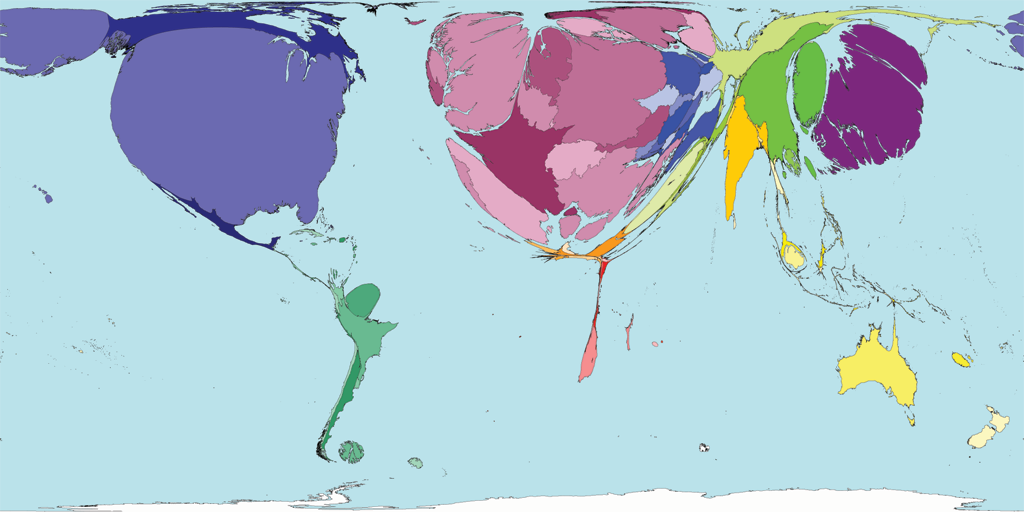
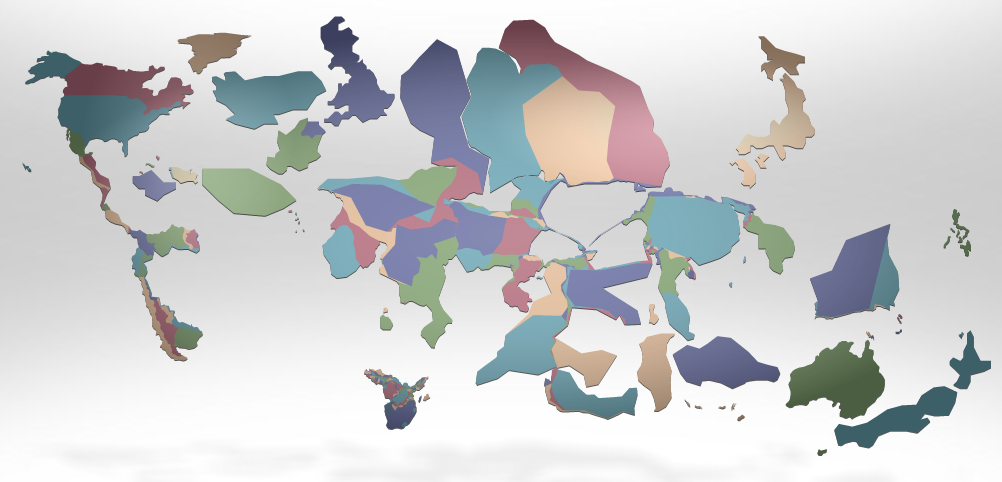
One interesting set of cartograms from worldmapper.org relates to scientific research. The first shows the amounts of science papers (as of 2001) authored by people living in the respective areas:

Science Research (Number of research articles, Source: Worldmapper.org)

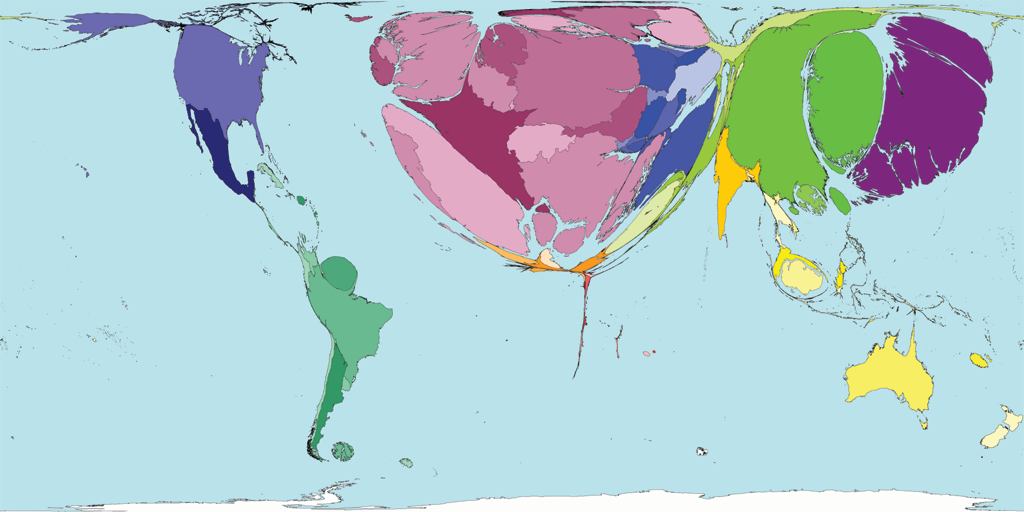
Another shows the growth in the above number between 1990 and 2001:

Science Growth (Change in Number of research articles, Source: Worldmapper.org)

From worldmapper.org:

This map shows the growth in scientific research of territories between 1990 and 2001. If there was no increase in scientific publications that territory has no area on the map.

In 1990, 80 scientific papers were published per million people living in the world, this increased to 106 per million by 2001. This increase was experienced primarily in territories with strong existing scientific research. However, the United States, with the highest total publications in 2001, experienced a smaller increase since 1990 than that in Japan, China, Germany and the Republic of Korea. Singapore had the greatest per person increase in scientific publications.

It is worth noting that the trends depicted are based on data one decade old. It is likely, however, that those trends have continued over the past decade, something which Neil deGrasse Tyson points out with concern regarding the relative decline of scientific research in America in this YouTube video:

Another point Tyson emphasizes is the near total absence of scientific research from the entire continent of Africa as evidenced by the disappearance of the continent on the cartogram. With about a billion people living there it is one of the stark visualizations of the challenges they face to escape from their poverty trap.

 
Leave a comment

Posted by on January 3, 2012 in Scientific, Socioeconomic


Tags: , ,

Underestimating Wealth Inequality

Underestimating Wealth Inequality

What are people’s perceptions about estimated, desirable and actual levels of economic inequality? Behavioral economist Dan Ariely from Duke University and Michael Norton from Harvard Business School conducted a survey of ~5,500 respondents across the United States to find out. Their survey asked questions about wealth inequality (as compared to income inequality), also known as net worth, essentially the value of all things owned minus all things owed (assets minus debt).

Addendum 3/9/2013: A recently posted 6min video illustrating these findings went viral (4 million+ views). It is worth watching:

The authors published the paper here and Dan Ariely blogged about it here in Sep 2010. One of the striking results is summarized in this chart of the wealth distribution across five quintiles:

From their Legend:

The actual United States wealth distribution plotted against the estimated and ideal distributions across all respondents. Because of their small percentage share of total wealth, both the ‘‘4th 20%’’ value (0.2%) and the ‘‘Bottom 20%’’ value (0.1%) are not visible in the ‘‘Actual’’ distribution.

It turned out that most respondents described a fairly equal distribution as the ideal – something similar to the wealth distribution in a country like Sweden. They estimated – correctly – that the U.S. has higher levels of wealth inequality. However, they nevertheless grossly underestimated the actual inequality, which is far higher still. Especially the bottom two quintiles are almost non-existent in the actual distribution. There was much more consensus than disagreement across groups from different sides of the political spectrum about this. From the current policy debates one would not have expected that. They go on to ask the question:

Given the consensus among disparate groups on the gap between an ideal distribution of wealth and the actual level of wealth inequality, why are more Americans, especially those with low income, not advocating for greater redistribution of wealth?

In the last chapter of their paper the authors offer several explanations of this phenomenon. One of them is the observation that the apparent drastic under-estimation of the degree of inequality seems to reveal a lack of awareness of the size of the gap. This is something that Data Visualization and interactive charts can help address. For example, Catherine Mulbrandon’s Blog Visualizing Economics does a great job in that regard.

The authors go on to look at other aspects from the perspective of psychology and behavioral economics. While fascinating in its own right, this excursion is beyond the scope of my Data Visualization Blog. They conclude their paper with general observations

…suggesting that even given increased awareness of the gap between ideal and actual wealth distributions, Americans may remain unlikely to advocate for policies that would narrow this gap.

 
2 Comments

Posted by on December 12, 2011 in Socioeconomic


Tags: , , ,

Inequality on Twitter

Inequality on Twitter

A lot has been written about economic inequality as measured by distribution of income, wealth, capital gains, etc. In previous posts such as Inequality, Lorenz-Curves and Gini-Index or Visualizing Inequality we looked at various market inequalities (market share and capitalization, donations, etc.) and their respective Gini coefficients.

With the recent rise of social media we have other forms of economy, in particular the economy of time and attention. And we have at least some measures of this economy in the form of people’s activities, subscriptions, etc. Whether it’s Connections on LinkedIn, Friends on FaceBook, Followers on Twitter – all of the social media platforms have some social currencies for attention. (Influence is different from attention, and measuring influence is more difficult and controversial – see for example the discussions about Klout-scores.)

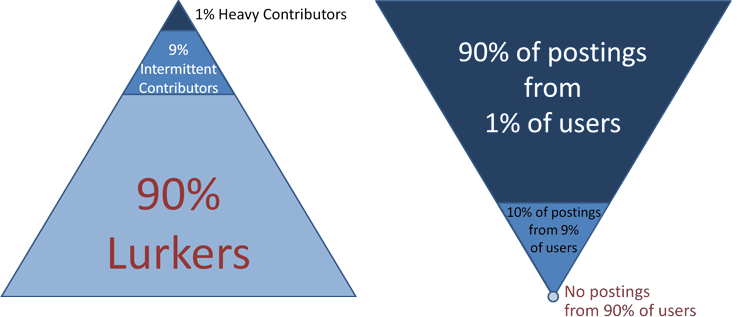
Another interesting aspect of online communities is that of participation inequality. Jakob Nielsen did some research on this and coined the well-known 90-9-1 rule:

“In most online communities, 90% of users are lurkers who never contribute, 9% of users contribute a little, and 1% of users account for almost all the action.”

The above linked article has two nice graphics illustrating this point:

Illustration of participation inequality in online communities (Source: Jakob Nielsen)

As a user of Twitter for about 3 years now I decided to do some simple analysis, wondering about the degrees of inequality I would find there. Imagine you want to spread the word about some new event and send out a tweet. How many people you reach depends on how many followers you have, how many of those retweet your message, how many followers they have, how many other messages they send out and so on. Let’s look at my first twitter account (“tlausser”); here are some basic numbers of my followers and their respective followers:

Followers of tlausser Followers on Twitter

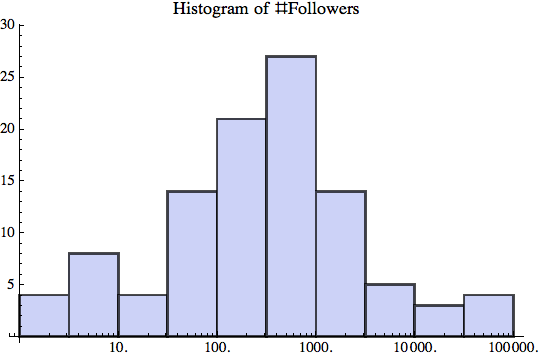
Some of my followers have no followers themselves, one has nearly 100,000. On average, they have about 3600 followers; however, the total of about 385,000 followers is extremely unequally distributed. Here are three charts visualizing this astonishing degree of inequality:

Of 107 followers, the top 5 have ~75% of all followers that can be reached in two steps. The corresponding Gini index of 0.90 is an example of extreme inequality. From an advertising perspective, you would want to focus mostly on getting these 5% to react to your message (i.e. retweet). In a chart with linear scale the bottom half does barely register.

Most of my followers have between 100-1000 followers themselves, as can be seen from this log-scale Histogram.

What kind of distribution is the number of followers? It seems that Log[x] is roughly normal distributed.

As for participation inequality, let’s look at the number of tweets that those (107) followers send out.

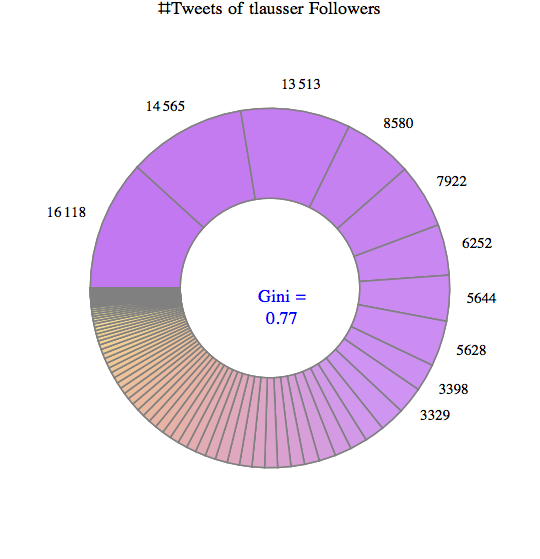
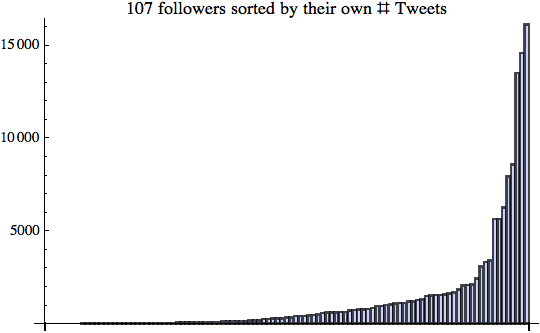
Some of them have not tweeted anything, the chattiest has sent more than 16,000 tweets. On average, each follower has 1280 tweets; the total of 137,000 tweets is again highly unequally distributed for a Gini index of 0.77.

The top 10 make up about 2/3 of the entire conversation.

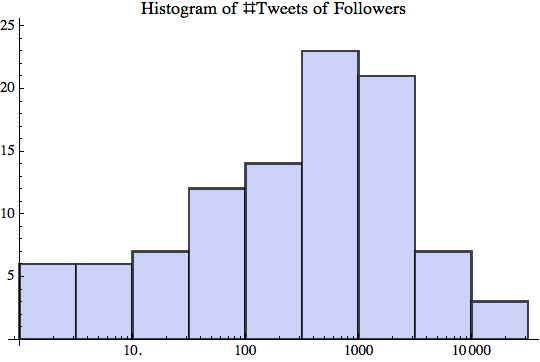
Again the bottom half hardly contributes to the number of tweets; however, the ramp in the top half is longer and not quite as steep as with the number of followers. Here is the log-scale Histogram:

I did the same type of analysis for several other Twitter Users in the central range (between 100-1000 follower). The results are similar, but certainly not yet robust enough to statistical sampling errors. (A larger scale analysis would require a higher twitter API limit than my free 350 per hour.)

These preliminary results indicate that there are high degrees of inequality regarding the number of tweets people send out and even more so regarding the number of followers they accumulate. How many tweets Twitter users send out over time is more evenly distributed. How many followers they get is less evenly distributed and thus leads to extremely high degrees of inequality. I presume this is caused in part due to preferential attachment as described in Barabasi’s book “Linked: The new science of networks“. Like with all forms of attention, who people follow depends a lot on who others are following. There is a very long tail of small numbers of followers for the vast majority of Twitter users.

That said, the degree of participation inequality I found was lower than the 90-9-1 rule, which corresponds to an extreme Gini index of about 0.96. Perhaps that’s a sign of the Twitter community having evolved over time? Or perhaps just a sign of my analysis sample being too small and not representative of the larger Twitterverse.

In some way these new media are refreshing as they allow almost anyone to publish their thoughts. However, it’s also true that almost all of those users remain in relative obscurity and only a very small minority gets the lion share of all attention. If you think economic inequality is too high, keep in mind that attention inequality is far higher. Both are impacting the policy debate in interesting ways.

Turning social media attention into income is another story altogether. In his recent Blog post “Turning social media attention into income“, author Srininvas Rao muses:

“The low barrier to entry created by social media has flooded the market with aspiring entrepreneurs, freelancers, and people trying to make it on their own. Standing out in it is only half the battle. You have to figure out how to turn social media attention into social media income. Have you successfully evolved from blogger to entrepreneur? What steps should I take next?”

 
10 Comments

Posted by on December 6, 2011 in Industrial, Scientific, Socioeconomic


Tags: , , ,

World Cartogram of Mobile Phone Adoption

World Cartogram of Mobile Phone Adoption

Under the slogan “Our Changing World”, FedEx has developed a website with various cartograms showing world-wide socio-economic changes based on publicly available data from sources such as World Bank, UNESCO, World Health Organization and others.

Cartograms visualize a particular metric by adjusting a country’s size corresponding to that metric. It leaves country neighborhood relationships (which we blogged about here) intact, but inflates or deflates countries, often dramatically so. Here is a series of three cartograms showing the adoption of mobile phones in the years 1995, 2000, and 2008. Size of each country is proportional to the density of mobile phones (average # mobile phones per 100 people).

Mobile Phone Density 1995

Mobile Phone Density 2000

Mobile Phone Density 2008

From the Topic Info on the Mobile Phone Presence display:

In 1996, mobile phones were a Nordic phenomenon. A Swede was twice as likely as an American to own one, and five times as likely as a German. Skip forward four years and the picture changed radically. Mobile phone usage boomed ten-fold across Europe; most European nations caught up with their northern neighbours. Eight years later. Africa suddenly loomed large. Mobile-phone penetration in same emerging economies now outstrips that of the developed world; Algeria tops the US. In most countries, mobile phone use is now ubiquitous. Lacking a mobile phone is more striking today than possessing one.

Indeed, it’s hard to find a country with very small mobile phone presence – and then to pinpoint it on the cartogram. One country I found was Cuba: While most countries in the Americas have between 50-100, Cuba has only 3 mobile phones per 100 people.

A few months ago Nathan Yau covered this topic on his FlowingData Blog here. As he already suggested, there are many more data to explore on FedEx’s website, so check it out for yourself here.

 
1 Comment

Posted by on November 20, 2011 in Industrial, Scientific, Socioeconomic


Tags: , ,

The Observatory of Economic Complexity

The Observatory of Economic Complexity

In this second part we will look at the online interactive visualizations as a companion to the first part’s Atlas of Economic Complexity. It’s interesting that the authors chose the title “Observatory”, as if to convey that with a good (perhaps optical) instrument you can reveal otherwise hidden structure. To repeat one of the fundamental tenets of this Blog: Interactive graphics allow the user to explore data sets and thus to develop a better understanding of the structure and potentially create otherwise inaccessible insights. This is a good example.

The two basic dimensions for exploration of trade data are products and countries. The most recent world trade data is from 2009 and it ranges back between 20 to 50 years (varying by country). I worked with three types of charts: TreeMaps, Stacked Area Charts, and the Product Space network diagram. Let’s start with Germany’s Exports in 2009:

Hovering the cursor over a node highlights it’s details, here “Printing Presses”, a product type where Germany enjoys a high degree of Revealed Comparative Advantage (RCA). (For details on RCA or any other aspects of the product space concept and network diagram, please see the previous post on the Atlas of Economic Complexity.) We can now explore which other countries are exporting printing presses:

While Germany clearly dominates this world market with 55% at $2.7b in 2009 with RCA = 5.6, the time slider at the bottom (with data since 1975) reveals that it has actually held an even bigger lead for most of the last 35 years. For example, with it’s exports in Printing Presses Germany commanded 72% at 3.7b in 2001 with RCA = 6.3 From the timeline one can also see how the United States captured about 20% of this (then much smaller) market for a brief period between 1979 and 1983. During this time its RCA for Printing Presses was just a bit above 1.0 – which shows as a black square in the Product Space – but the United States has since lost this advantage and not seen any significant exports in this product type. Printing Presses being a fairly complex product, only a handful of countries are exporting them, almost all of them European and Japan. There might be an interesting correlation between complexity and inequality, as the capabilities for the production of complex products tend to cluster in a few countries worldwide which then dominate world exports accordingly.

Another powerful instrument are Stacked Area Charts. Here you can see how a country’s Imports or Exports evolve over time, either in terms of absolute value or relative share of product types. For example, let’s look at the last 30 years (1978-2008) of Export data for the United States:

This GIF file (click if not animated) shows several frames. In Value display style one can see the absolute size and how Exports grew roughly 10-fold from about $100b to $1t over the course of those 30 years. The Share display style focuses on relative size, with all Exports always representing 100%. In the Observatory one can hover over any product type and thus highlight that color band to see the evolution of this product type’s Exports over time. In the highlighted example here, we can see how ‘Cereal and Vegetable Oil’ (yellow band) shrank from around 15% in the late seventies to around 5% since the late nineties. ‘Chemicals and Health Related Products’ (purple band) has remained more or less constant around a 10% Export share. ‘Electronics’ bloomed in the mid eighties from less than 10% to 15-20% and stayed on the high end of that range until around the year 2000 before shrinking in the last decade down to about 10%.

As a final example, look at the relative size of imports of the United States over the last 40 years, (1968 – 2008, sorted by final value):

The biggest category is crude petroleum products at the bottom. During the two oil shocks in the seventies the percentage peaked near 30% of all imports. Then it went down and stayed below 10% between 1985 – 2005. Since then it’s percentage has been steadily rising and reached about 15% again. (The data isn’t enough up-to-date to illustrate the impact of the 2008 recession.) Such high expenses are crowding out other categories. When the consumer pays more at the pump there is less to spend for other product types. Another interesting aspect of this last chart is that the bottom two bands represent opposite ends of the product complexity spectrum: Petroleum (brown) on the low end, cars (blue) on the high end.

As always, the real power of interactive visualizations comes from interacting with them. So I encourage you to explore these data at the Observatory of Economic Complexity.

Caveats: I noticed a couple of minor areas which seem to be either incomplete, counter-intuitive, poor design choices or simply implementation bugs. To start, there is no help or documentation of the visualization tool itself. Many of the diagram types on the left are grayed out and it is not always apparent what selection of products, countries or chart type will enable certain subselections. For example, there is a chart type “Predictive Tools” with two subtypes “Density Bars” and “Stepping Stone” that always seem to be grayed out? The same applies to Maps (presumably geographic maps) – all subtypes are grayed out. Perhaps I am missing something – would appreciate any comments if that’s the case.

In the TreeMaps for import and export one can not see the overall value of the overall trade (top-level rectangle) or any of the categories (second-level rectangles). Only the tooltips will show the value of a specific product type or country (third-level rectangle). The color legend is designed for the product space and designates the 34 communities of product types. When you hover the mouse over one product type, say garments (in green), then all imports / exports other than that product type are grayed out. When you show a product import / export chart, however, those same colors are used to designate groups of countries with color indicating continents (blue for Europe, red for the Americas, green for Asia etc.). Yet when you hover over the product icon in the legend (say garment), then only it’s corresponding color’s countries remains highlighted, which doesn’t make sense and can be misleading.
When you play the timeline in a TreeMap, the frequent change in layout can be confusing. A change from one year to the next played back and forth slowly or multiple times can be instructive, but a quick series of too many changes (particularly without seeing the labels) is just confusing.

In the stacked area charts when you click on Build Visualization it always comes up in “Value” style, even if “Share” is selected. To get to the Share style, you have to select Value and then Share again.

TreeMaps and Stacked Area Charts critically depend on the availability of data for all products / countries displayed. For years before 1990 there appear to be pockets of only sparsely available data, which then falsely suggests world market dominance of those products or countries. For example, the TreeMap for Imports in Printing Presses for 1983 shows the United States with 97% taking practically the entire market. In 1984, it’s share shrinks to a more balanced 28% despite growing very rapidly; simply because data for other countries from Europe, Asia etc. seems to not be available prior to 1984. In such cases it would have been better to show the rest as gray rectangle instead of leaving it out (if world import data are available) or just not display any chart for years with grossly incomplete data.

Navigation is somewhat limited. For example, looking at a country chart (say United Kingdom), it would be great to click on any product type (say crude petroleum) and get to a corresponding Stacked Area Chart diagram for that product type. One can do so using the drop-down boxes on the right, but that’s less intuitive.

There are two export formats (PDF and SVG). The vector graphics is a good choice since the fonts can be rendered fine even in the small print. I obtained poor results with PDF, however, as often the texts in TreeMaps were not aligned properly and printed on top of one another.

None of the above is a serious problem or even a showstopper. It would be great, however, if there was a feedback link to provide such info back to the authors and help improve the utility of this observatory.

 
1 Comment

Posted by on November 14, 2011 in Industrial, Scientific, Socioeconomic


Tags: , ,

The Atlas of Economic Complexity

The Atlas of Economic Complexity

Here is a recipe: Bring together renowned faculties like the MIT Media Lab and Harvard’s Center for International Development. Combine novel ideas about economic measures with years of solid economic research. Leverage large sets of world trade data. Apply network graph theory algorithms and throw in some stunning visualizations. The result: The Atlas of Economic Complexity, a revolutionary way of looking at world trade and understanding variations in countries paths to prosperity.

The main authors are Professors Ricardo Hausmann from Harvard and Cesar Hidalgo from MIT (whose graphic work on Human Development Indices we have reviewed here). The underlying research began in 2006 with the idea of the product space which was published in Science in 2007. This post is the first in a two-part series covering both the atlas (theory, documentation) as well as the observatory (interactive visualization) of economic complexity. This research is an excellent example of how the availability of large amounts of data, computing power and free distribution via the Internet enable entirely new ways of looking at and understanding our world.

The Atlas of Economic Complexity is rooted in a set of ideas about how to measure economies based not just on the quantity of products traded, but also on the required knowledge and capabilities to produce them. World Trade data allows us to measure import and export product quantities directly, leading to indicators such as GDP, GDP per capita, Growth of GDP etc. However, we have no direct way to measure the knowledge required to create the products. A central observation is that complex products require more capabilities to produce, and countries who manufacture more complex products must possess more of these capabilities than others who do not. From Part I of the Atlas:

Ultimately, the complexity of an economy is related to the multiplicity of useful knowledge embedded in it. For a complex society to exist, and to sustain itself, people who know about design, marketing, finance, technology, human resource management, operations and trade law must be able to interact and combine their knowledge to make products. These same products cannot be made in societies that are missing parts of this capability set. Economic complexity, therefore, is expressed in the composition of a country’s productive output and reflects the structures that emerge to hold and combine knowledge.

Can we analyze world trade data in such a way as to tease out relative rankings in terms of these capabilities?

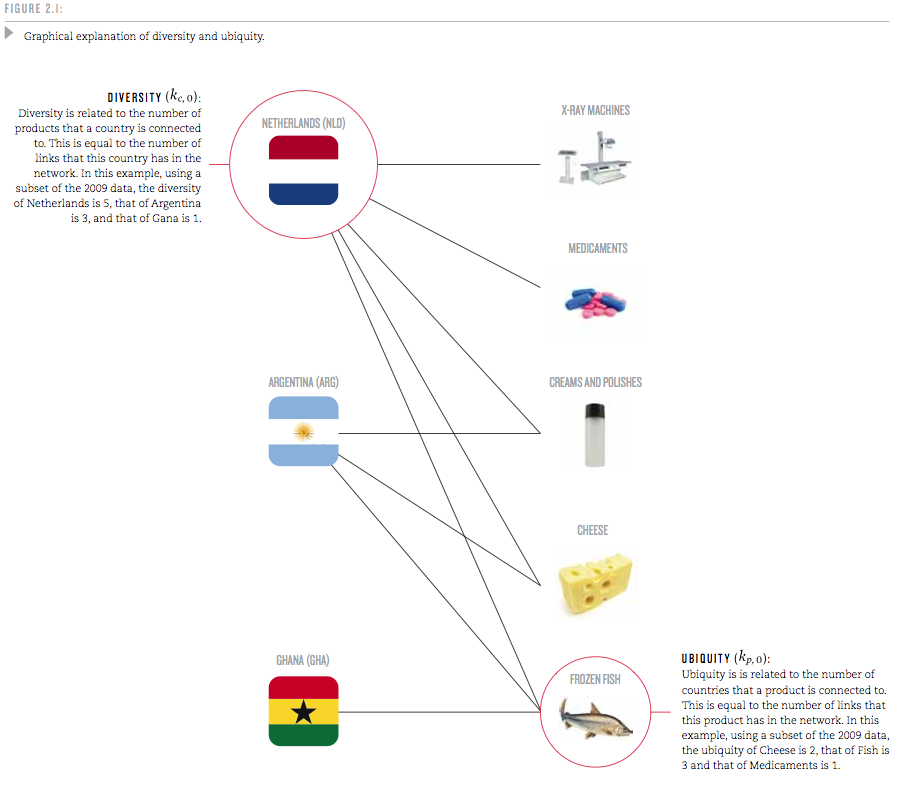
To this end, the authors start by looking at the trade web of countries exporting products. For each country, they examine how many different products it is capable of producing; this is called the country’s Diversity. And for each product, they look at how many countries can produce it; this is called the product’s Ubiquity. Based on these two measures, Diversity and Ubiquity, they introduce two complexity measures: The Economic Complexity Index (ECI, for a country) and the Product Complexity Index (PCI, for a product).

The mechanics of how these measures are calculated are somewhat sophisticated. Yet they encode some straightforward observations and are explained with some examples:

Take medical imaging devices. These machines are made in few places, but the countries that are able to make them, such as the United States or Germany, also export a large number of other products. We can infer that medical imaging devices are complex because few countries make them, and those that do tend to be diverse. By contrast, wood logs are exported by most countries, indicating that many countries have the knowledge required to export them. Now consider the case of raw diamonds. These products are extracted in very few places, making their ubiquity quite low. But is this a reflection of the high knowledge-intensity of raw diamonds? Of course not. If raw diamonds were complex, the countries that would extract diamonds should also be able to make many other things. Since Sierra Leone and Botswana are not very diversified, this indicates that something other than large volumes of knowledge is what makes diamonds rare.

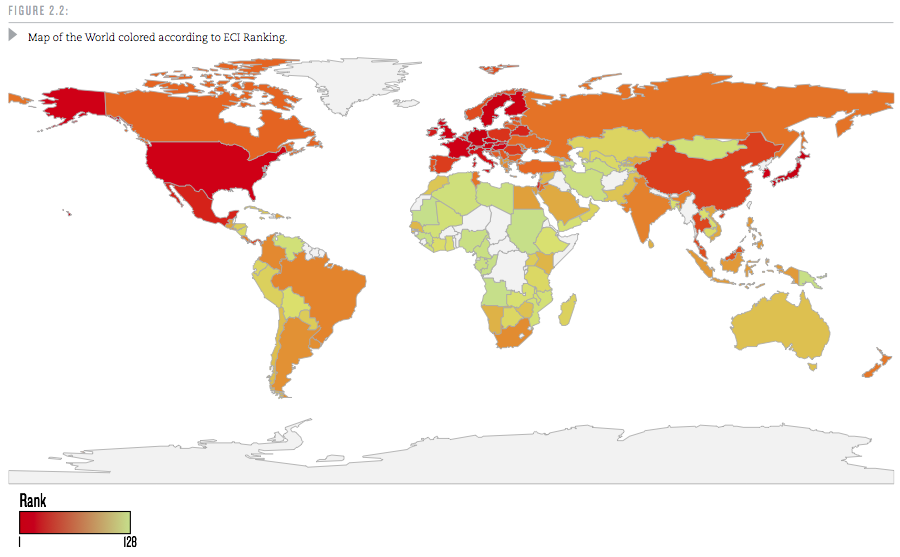
A useful question is this: If a good cannot be produced in a country, where else can it be produced? Countries with higher economic complexity tend to produce more complex products which can not easily be produced elsewhere. The algorithms are specified in the Atlas, but we will skip over these details here. Let’s take a look at the ranking of some 128 world countries (selected above minimum population size and trade volume as well as for reliable trade data availability).
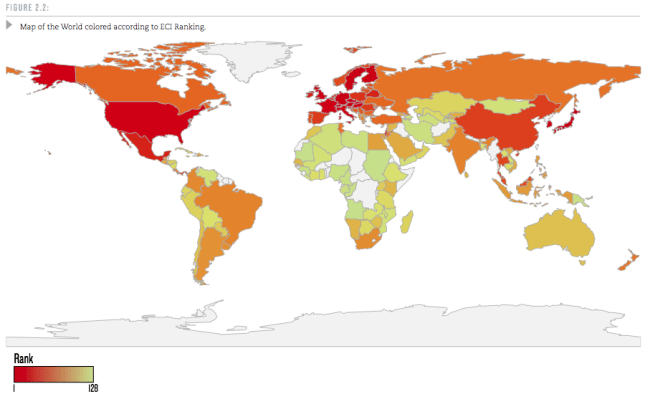
Why is Economic Complexity important? The Atlas devotes an entire chapter to this question. The most important finding here is that ECI is a better predictor of a country’s future growth than many other commonly used indicators that measure human capital, governance or competitiveness.

Countries whose economic complexity is greater than what we would expect, given their level of income, tend to grow faster than those that are “too rich” for their current level of economic complexity. In this sense, economic complexity is not just a symptom or an expression of prosperity: it is a driver.

They include a lot of scatter-plots and regression analysis measuring the correlation between the above and other indicators. Again, the interested reader is referred to the original work.

Another interesting question is how Economic Complexity evolves. In some ways this is like a chicken & egg problem: For a complex product you need a lot of capabilities. But for any capability to provide value you need some products that require it. If a new product requires several capabilities which don’t exist in a country, then starting the production of such a product in the country will be hard. Hence, a country’s products tend to evolve along the already existing capabilities. Measuring the similarities in required capabilities directly would be fairly complicated. However, as a first approximation, one can deduce that products which are more often produced by the same country tend to require similar capabilities.

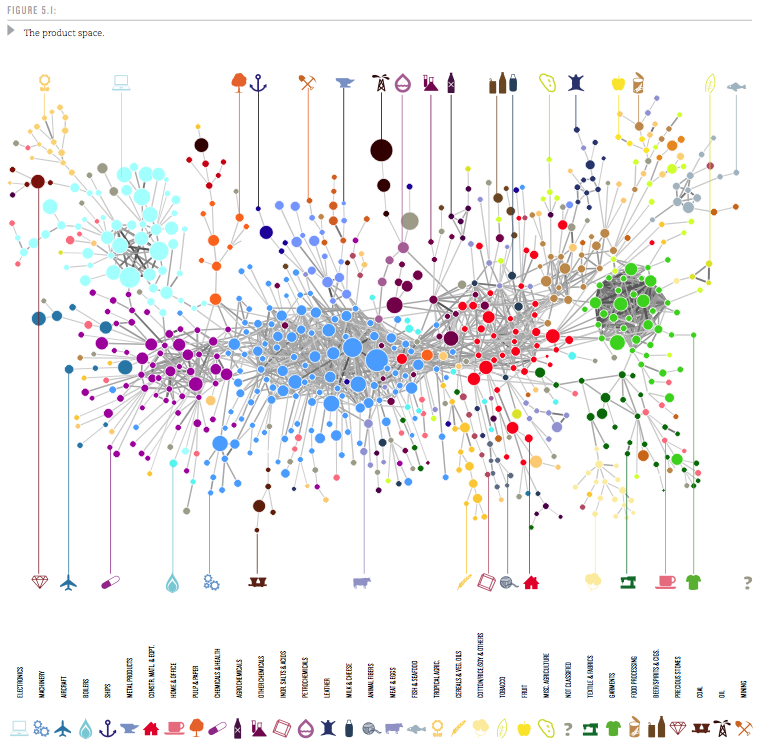
So the probability that a pair of products is co-exported carries information about how similar these products are. We use this idea to measure the proximity between all pairs of products in our dataset (see Technical Box 5.1 on Measuring Proximity). The collection of all proximities is a network connecting pairs of products that are significantly likely to be co-exported by many countries. We refer to this network as the product space and use it to study the productive structure of countries.

Then the authors proceed to visualize the Product Space. It is a graph with some 774 nodes (products) and edges representing the proximity values between those nodes. Only the top 1% strongest proximity edges are shown to keep the average degree of the graph below 5 (showing too many connections results in visual complexity). Network Science Algorithms are used to discover the highly connected communities into which the products naturally group. Those 34 communities are then color-coded. Using a combination of Minimum-Spanning-Tree and Force-Directed layout algorithms the network is then laid out and manually optimized to minimize edge crossings. The resulting Product Space graph looks like this:
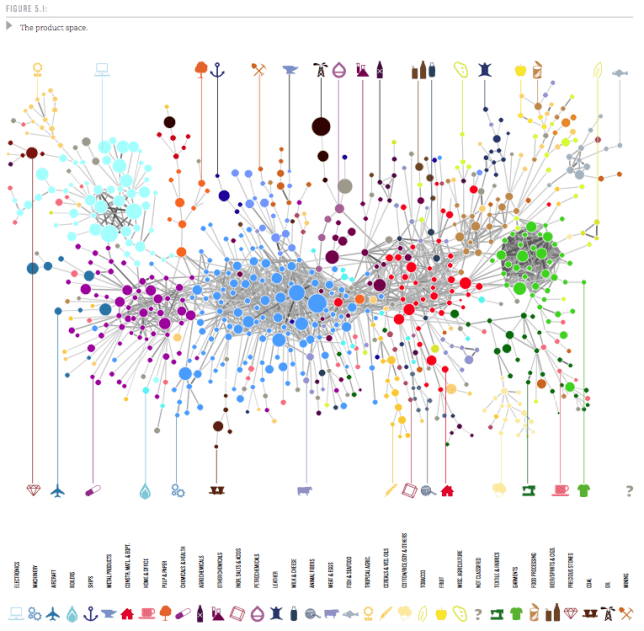
Here the node size is determined by world trade volume in the product. If you step back for a moment and reflect on how much data is aggregated in such a graph it is truly amazing! One variation of the graph determines size by the Product Complexity as follows:
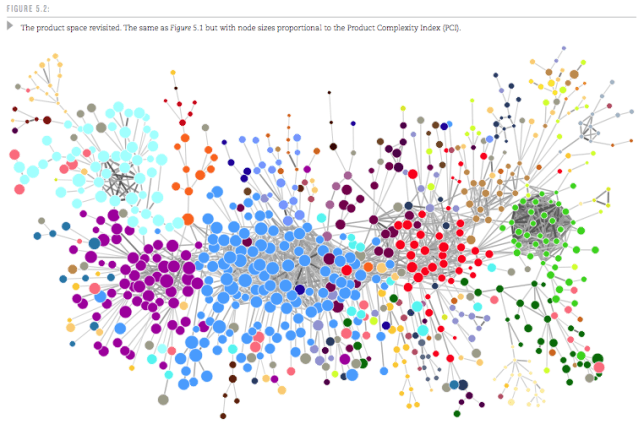
In this graph one can see that products within a community are of similar complexity, supporting the idea that they require similar capabilities, i.e. have high proximity. From these visualizations one can now analyze how a country moves through product space over time. Specifically, in the report there are graphs for the four countries Ghana, Poland, Thailand, and Turkey over three points in time (1975, 1990, 2009). From the original document I put together a composite showing the first two countries, Ghana and Poland.
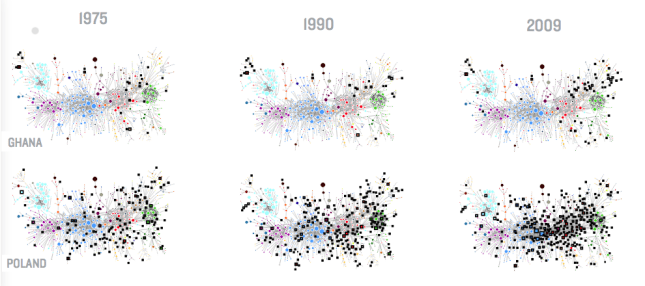
While Ghana’s ECI doesn’t change much, Poland grows into many products similar to those where they started in 1975. This clearly increases Poland’s ECI and contributes to the strong growth Poland has seen since 1975. (Black squares show products produced by the country with a Revealed Comparative Advantage RCA > 1.0.)

In all cases we see that new industries –new black squares– tend to lie close to the industries already present in these countries. The productive transformation undergone by Poland, Thailand and Turkey, however, look striking compared to that of Ghana. Thailand and Turkey, in particular, moved from mostly agricultural societies to manufacturing powerhouses during the 1975-2009 period. Poland, also “exploded” towards the center of the product space during the last two decades, becoming a manufacturer of most products in both the home and office and the processed foods community and significantly increasing its participation in the production of machinery. These transformations imply an increase in embedded knowledge that is reflected in our Economic Complexity Index. Ultimately, it is these transformations that underpinned the impressive growth performance of these countries.

The Atlas goes on to provide rankings of countries along five axes such as ECI, GDP per capita Growth, GDP Growth etc. The finding that higher ECI is a strong driver for GDP growth allows for predictions about GDP Growth until 2020. In that ranking there are Sub-Saharan East Africa countries on the top (8 of the Top 10), led by Uganda, Kenya and Tanzania. Here is the GDP Growth ranking in graphical form – the band around the Indian Ocean is where the most GDP Growth is going to happen during this decade.

Each country has its own Product Space map. It shows which products and capability sets the country already has, which other similar products it could produce with relatively few additional capabilities and where it is more severely lacking. As such it can provide both the country or a multi-national firm looking to expand with useful information. The authors sum up the chapter on how this Atlas can be used as follows:

A map does not tell people where to go, but it does help them determine their destination and chart their journey towards it. A map empowers by describing opportunities that would not be obvious in the absence of it. If the secret to development is the accumulation of productive knowledge, at a societal rather than individual level, then the process necessarily requires the involvement of many explorers, not just a few planners. This is why the maps we provide in this Atlas are intended for everyone to use.

We will look at the rich visualizations of the data sets in this Atlas in a forthcoming second installment of this series.

 
6 Comments

Posted by on November 10, 2011 in Industrial, Scientific, Socioeconomic


Tags: , , ,

Implementation of TreeMap

Implementation of TreeMap

After posting on TreeMaps twice before (TreeMap of the Market and original post here) I wanted to better understand how they can be implemented.

In his book “Visualize This” – which we reviewed here – author Nathan Yau has a short chapter on TreeMaps, which he also published on his FlowingData Blog here. He is working with the statistical programming language R and uses a library which implements TreeMaps. While this allows for very easy creation of a TreeMap with just a few lines of code, from the perspective of how the TreeMap is constructed this is still a black box.

I searched for existing implementations of TreeMaps in Mathematica (which I am using for many visualization projects). Surprisingly I didn’t find any implementations, despite the 20 year history of both the Mathematica platform and the TreeMap concept. So I decided to learn by implementing a TreeMap algorithm myself.

Let’s recap: A TreeMap turns a tree of numeric values into a planar, space-filling map. A rectangular area is subdivided into smaller rectangles with sizes in relation to the values of the tree nodes. The color can be mapped based on either that same value or some other corresponding value.

One algorithm for TreeMaps is called slice-and-dice. It starts at the top-level and works recursively down to the leaf level of the tree. Suppose you have N values at any given level of the tree and a corresponding rectangle.
a) Sort the values in descending order.
b) Select the first k values (0<k<N) which sum to at least the split-ratio of the values total.
c) Split the rectangle into two parts according to split-ratio along its longer side (to avoid very narrow shapes).
d) Allocate the first k values to the split-off part, the remaining N-k values to the rest of the rectangle.
e) Repeat as long as you have sublists with more than one value (N>1) at current level.
f) For each node at current level, map its sub-tree onto the corresponding rectangle (until you reach leaf level).

As an example, consider the list of values {6,5,4,3,2,1}. Their sum is 21. If we have a split-ratio parameter of say 0.4, then we split the values into {6,5} and {4,3,2,1} since the ratio (6+5)/21 = 0.53 > 0.4, then continue with {6,5} in the first portion of the rectangle and with {4,3,2,1} in the other portion.

Let's look at the results of such an algorithm. Here I'm using a two-level tree with a branching factor of 6 and random values between 0 (dark) and 100 (bright). The animation is iterating through various split-ratios from 0.1 to 0.9:

Notice how the layout changes as a result of the split-ratio parameter. If it’s near 0 or 1, then we tend to get thinner stripes; when it’s closer to 0.5 we get more square shaped containers (i.e. lower aspect ratios).

The recursive algorithm becomes apparent when we use a tree with two levels. You can still recognize the containers from level 1 which are then sub-divided at level 2:

One of the fundamental tenets of this Blog is that interactive visualizations lead to better understanding of structure in the data or of the dynamic properties of a model. You can interact with this algorithm in the TreeMap model in Computable Document Format (CDF). Simply click on the graphic above and you get redirected to a site where you can interact with the model (requires one-time loading of the free CDF Browser Plug-In). You can change the shape of the outer rectangle, adjust the tree level and split-ratio and pick different color-schemes. The values are shown as Tooltips when you hover over the corresponding rectangle. You also have access to the Mathematica source code if you want to modify it further. Here is a TreeMap with three levels:

Of course a more complete implementation would allow to vary the color-controlling parameter, to filter the values and to re-arrange the dimensions as different levels of the tree. Perhaps someone can start with this Mathematica code and take it to the next level. The previous TreeMap post points to several tools and galleries with interactive applications so you can experiment with that.

Lastly, I wanted to point out a good article by the creator of TreeMaps, Ben Shneiderman. In this 2006 paper called “Discovering Business intelligence Using Treemap Visualizations” he cites various BI applications of TreeMaps. Several studies have shown that TreeMaps allow users to recognize certain patterns in the data (like best and worst performing sales reps or regions) faster than with other more traditional chart techniques. No wonder that TreeMaps are finding their way into more and more tools and Dashboard applications.

 
4 Comments

Posted by on November 9, 2011 in Industrial, Scientific


Tags: , , ,

7 Billion

7 Billion

World population has just reached 7 Billion this week. Exploring the growth of population and related aspects such as consumption, land use, urbanization etc. lends itself very well to data visualization. In this context, the National Geographic Society has released a free iPad app called “7 Billion” together with its Special Series: 7 Billion website.

The iPad app features some interesting charts under the heading “The Shape Of Seven Billion”. These visualizations come in the form of cartograms, a type of map that ignores a country’s true physical size and scales the size according to other data. Here they show population (current 2011 vs. 1960, when world population was around 3 Billion).

Population Cartogram 2011 (Source: National Geographic iPad App 7 Billion)

The position of countries is roughly preserved, the size is proportionate to the country population, and the color legend shows the amount of growth since 1960. The strongest growth (red, more than 300%) happened in Africa and the Middle East. Europe, Russia and Japan had the least amount of growth (blue, under 50%). India and China are by far the most populous countries, with India growing faster than China.

Another interesting cartogram illustrates consumption (as measured in Gross Domestic Product, GDP). Here the reference year is 1980 and is shown first in black & white:

Consumption Chart 1980 (Source: National Geographic, iPad App 7-Billion)

Compare this to the current Consumption or GDP distribution as of 2011:

World Consumption Chart 2011 (Source: National Geographic iPad App 7 Billion)

The size of the countries here is proportionate to their GDP (in constant international dollars using purchase power parity rates). The color scale has red (more than $40,000 per capita) and blue (less than $3,000 per capita) on both ends of the spectrum. While the United States is clearly dominating this picture, Europe has about the same size and China isn’t far behind. However, China has had the world’s largest GDP increase of 1,506% since 1980 (~15 fold increase), whereas the GDP of the U.S. grew by 119% (a bit more than doubled) during the same period of time.

Ideally on would be able to see this cartogram animated over time with sizes of countries shrinking or growing and changing colors over time, similar to the Bubble Charts we looked at earlier on this Blog.

There are many other interesting charts in this interactive eBook style app. For example, here is a chart showing the population growth over time – a good visualization of the power of exponential growth.

World Population Growth and Projection (Source: National Geographic 7 Billion iPad App)

One graphic aims at explaining the main drivers behind the explosive growth over the last two centuries after relatively slow growth for millennia – the improvements in health care and resulting drop in death rate led to a period of far greater birth rates than death rates.

Population Growth as Function of Birth Rate minus Death Rate

An interesting visualization idea has been published in a video by NPR using buckets for each continents and visualizing birth rate as water drops into the bucket and death rates as drops out of the bucket. It is obvious that when more water is dropping in on the top (births) than dropping out at the bottom (deaths), then the buckets fill up.

As a final example, consider this chart visualizing our even faster growing environmental impact: Since there is not just the Population size, but at least two other factors – Affluence and Technology – the multiplicative impact is growing even faster. With the use of three dimensions and the formula I = P * A * T this yields a simple but effective illustration.

Multiplicative Human Impact through Population, Affluence and Technology

Of course a short Blog post can’t do justice to all aspects of an app or eBook. There is a lot more to this app than shown here. But I hope you got an impression as to how interactive graphics can help communicate abstract and quantitative ideas in a more intuitive way.

 
3 Comments

Posted by on November 4, 2011 in Socioeconomic


Tags: , ,

TreeMap of the Market

TreeMap of the Market

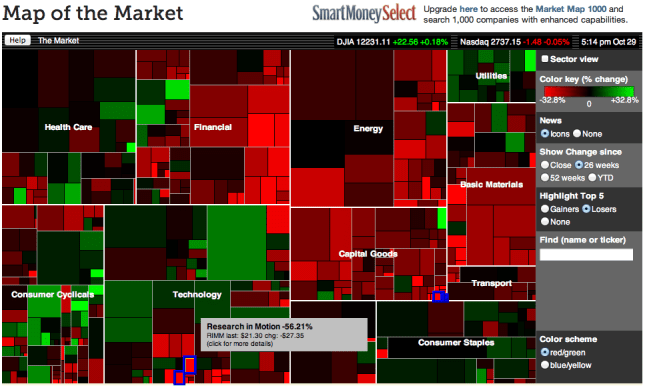
SmartMoney has an interactive visual tool on their website called “Map of the Market”. It is an application of the TreeMap concept developed by Ben Shneiderman which I have blogged about before here.

The map lets you watch more than 500 stocks at once, with data updated every 15 minutes. Each colored rectangle in the map represents an individual company. The rectangle’s size reflects the company’s market cap and the color shows price performance. (Green means the stock price is up; red means it’s down. Dark colors are neutral). Move the mouse over a company rectangle and a little panel will pop up with more information.

Map Of The Market (Source: SmartMoney website)

For example, the above map shows the 26 week performance with the Top 5 Losers highlighted (hovered over RIMM). More information from the corresponding Map Instructions page.

This map is also quite similar in concept to the StockTouch iPad app which I covered here. StockTouch displays 900 companies, grouped into 9 sectors. The above Map of the Market is a free service, with an available upgrade to one showing 1000 companies for a subscription fee. While interesting in its own right, however, this is not about the business model of how to monetize the use of such information.

It might be interesting to put together a time-lapse video showing this map for every close of business day throughout one year. Not only would one see the up and down movement by color, but also the gradual shifts in the cumulative size of various sectors due to the area in the tree map.

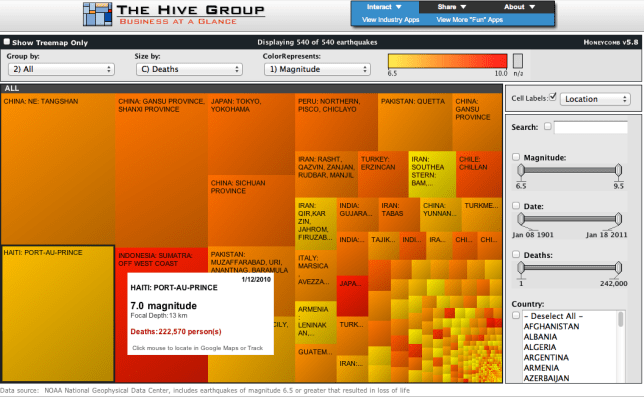
Another fascinating set of tree map uses is on display at the Gallery of the Hive Group website. Their interactive tree map product HoneyComb has been used in many different industries. The Gallery shows many examples, ranging from sales performance to manufacturing / quality applications to public interest uses such as browsing Olympic Games results or data on Earthquakes. See the following example screenshot (click to interact on the Hive Group website):

TreeMap of Earthquakes (Source: HiveGroup)

While you won’t get the full benefit of seeing the details of all 540 items in one view, you can filter using the panel controls on the right or change the grouping and size and color attributes. This shows for example that the most powerful earthquakes are generally not the most deadly ones and vice versa.

Interacting with these sample tree maps again drives home the fundamental notion that interactive visualizations lead to quicker grasp and better understanding of data sets. This is similar to how walking around and seeing an object from different perspectives gives you a better idea of it’s 3-D structure than seeing it just in one 2-D picture. With multiple ways of interacting it feels almost as if you’re walking inside the data set to see it from multiple angles and perspectives. You have to do it yourself to appreciate the difference it makes.

Lastly, a good article on some of the pitfalls of tree map design with lots of links to good/bad examples comes from the folks at Juice Analytics in their Blog post titled “10 lessons in Treemap Design“.

 
4 Comments

Posted by on October 29, 2011 in Financial, Industrial


Tags: , ,

Visualizations to navigate Healthcare

Visualizations to navigate Healthcare

One of the more powerful visualization websites I have seen recently is called “Healthymagination” created by GE. It features about 2 dozen visualizations, most of them interactive, on healthcare related topics such as Cost of Getting Sick, Heart Disease Myths vs. Facts, U.S. Health Profiles by State and County, leading Causes of Death etc.

From the GE Visualization About page:

“At GE, we believe data visualization is a powerful way to simplify complexity.

We are committed to creating visualizations that advance the conversation about issues that shape our lives, and so we encourage visitors to download, post and share these visualizations.”

These are built using the Visualizing Player tool from the Visualizing.Org community, which we covered in a previous Blog post here.

One visualization I found particularly useful shows hospital quality. Imagine you just moved to a new area and want to find out which are good nearby hospitals. How would you find out? Ask friends? Ask your doctor? Try one and switch if you have a bad experience? In most cases, you would not base your decision on a lot of data, or at best a small set of anecdotal experience.

With the hospital quality visualization you have a much better tool to base your decision on facts. The interactive set of graphic visualizes performance of hospitals by 30 measures about the best kinds of treatments or practices for common conditions for which Americans enter hospitals and seek care. Here is an example:

Florida Hospital Performance Rating based on 30 measures, 2009 Data

This aggregates a lot of data. You can see how some hospitals outperform the average and show mostly green measures (such as the Centers in Atlantis and Aventura), while others have more average (yellow) or below average (red) cells (such as the Boca Raton Community Hospital). On this high-level you can already decide in favor of a specific hospital, if you can afford to go there. If you are going to a specific hospital, you can use its scorecard to look at specific areas. Let’s look at the Bethesda Memorial Hospital in Boynton Beach as an example:

Performance Scorecard of Bethesda Memorial Hospital in Boynton Beach

It has only one red measure, here on Heart Disease Discharge Instructions. From the legend on the right you can learn what this performance measure captures and that the national average is 86.6%. Hovering with the mouse over the red cell shows the score for this particular hospital, here 68.7%. As a patient you can use such data to obtain additional information if you or one of your loved ones has been treated for heart disease at this hospital.

You can also look at the national average scores of hospitals across the United States for each of the 30 measures:

National Average Scores for U.S. hospitals

From this chart you can see that for example regarding Children’s Asthma, the in-patient measures are near 100% and very good, whereas the home management plans (what to do after going home) are only at 60%. Whether this indicates a general pattern – hospitals perform lower on discharge instructions than on in-patient care – would need to be validated across more than just two arbitrary selected examples. But in any event, this is a classic example of how the Internet and especially interactive visualizations based on recent and public data empowers the consumer in all areas, especially in Healthcare.

 
2 Comments

Posted by on October 27, 2011 in Medical


Tags: , , ,